 KARDINAL
Real estate teams · Guide
Agent pages for a real estate brokerage: a website for every agent on your team
Clients don't hire a brokerage. They hire an agent. Here's how to give every agent on your team a page that keeps the client with them, without a second website to manage.
By Harrison Holt · · 5 min read
A good website for a real estate team has to do two jobs. It has to sell the brokerage, and it has to put each client one tap from their agent. Most brokerage sites only do the first. They have a "Meet the agents" page: a grid of headshots, a bio, an office phone number and a contact form that lands in a shared inbox.
That page was built for the brokerage. Your clients came for the agent. When a buyer is standing in a driveway on a Saturday, they don't search for your company. They look for the person who showed them the house. If that person's number is buried, the next agent who answers wins.
A website for your real estate team, with a page for every agent
An agent page isn't a bio. It's the agent's front door on a client's phone. With Kardinal for teams, every agent gets:
- Their own page and app, with their name, photo, direct number and email.
- Their own leads. A request on their page goes to their email, or their cell when texting is on. Nothing sits in a shared inbox.
- Saved as a contact. One tap puts the agent in the client's phone, so the next call goes to them and not to whoever's on top of Google.
- Their own QR code and tap card for their business card, their sign and their car.
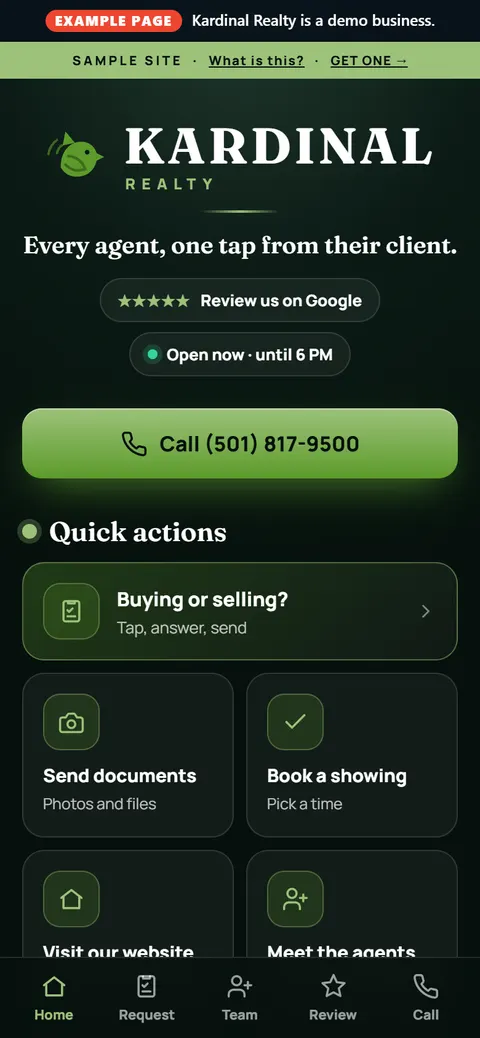
The team app around them lets clients do the rest from their phone. On the labelled Kardinal Realty sample that's "Buying or selling?", "Send documents", "Book a showing" and "Meet the agents".
The agent page checklist
Whatever you use, hold every agent page to this list. If a client can't do these in a few seconds on a phone, the page isn't working.
- Call the agent in one tap, on their direct line, from the first screen.
- Text the agent, only when the number can take texts, so nobody texts a landline.
- Save the agent to Contacts in one tap.
- Send a request that reaches that agent, not a general inbox.
- See a real photo and the agent's name, so the client knows they've got the right person.
- Get back to it later: on the home screen, from a QR code, from a link or from a tap card.
- Carry the brokerage's name, so the agent's page still sells the team.
Why the brokerage wins when the agent does
Some brokers worry that a page per agent hands the client to the agent. It's the other way around. The pages live on your team site and run from your admin. The client keeps their person, and their person keeps the brokerage's name in front of them.
It also fixes an old leak: the agent who prints their own cards, makes their own landing page and sends clients to a site the brokerage doesn't control. When every agent already has a good page on your team site, there's less reason to build a side one.
Agent pages vs. your IDX search
Your listings search (IDX, from your MLS feed) and your agent pages do different jobs. The search helps a stranger find a house. The agent page helps a client reach their agent. Kardinal for teams doesn't replace your listings search or your main website. It runs beside them, and your website can link to every agent's page.
What to put on the yard sign, the card and the open house
Each agent's page can be reached four ways, so use all four:
- The home screen. It saves like an app, a square icon with the name under it. No app store.
- Their own QR code. Put it on the business card, the sign rider, the open-house sign-in sheet and the listing flyer. The words next to it should say what happens: "Save my number" works better than "Scan me".
- A web address to text or email after a showing.
- A tap card. Tap it to a client's phone and the agent's page opens.
What happens when an agent joins or leaves
This is where most "agent websites" fall apart. Someone has to make the new agent's page, and someone has to take down the old one. With Kardinal for teams, the owner or a co-admin adds, edits and retires people from one admin, on their phone. You add a new agent there and their page goes on your team site. When someone leaves, you retire their page from the same place.
Agent pages vs. an agent website builder
| Each agent builds their own | Kardinal for teams | |
|---|---|---|
| Who runs it | Each agent, if they get to it | One admin for the whole team |
| Where leads go | Wherever the agent set up | That agent's email, or their cell when texting is on |
| Agent leaves | The page may stay up with their number | Retire it from the admin |
| Your main website | Unchanged | Unchanged. It runs beside it. |
What it costs
Kardinal for teams starts at $97 a month for the first person. Each agent after that is $27 a month, and $17 a month from the 11th person on.
| Team size | Per month | How it adds up |
|---|---|---|
| 10 people | $340 | $97 + 9 × $27 |
| 20 people | $510 | $97 + 9 × $27 + 10 × $17 |
| 30 people | $680 | $97 + 9 × $27 + 20 × $17 |
Monthly has a 6-month minimum, then it's month to month. Founding teams get every pack included during launch (Customer Feedback, Get Leads and Reach, which covers push notifications), and the price is locked for 12 months.
Request it for your brokerage → No payment to request.
For brokerages in Conway, Little Rock and Central Arkansas
Kardinal is made and run in Conway by Harrison Holt and ROI Systems. Brokerages in Conway, Little Rock, North Little Rock, Benton, Bryant, Cabot and the rest of Central Arkansas can sit down with him in person; teams anywhere else do it all by phone. More on that in team websites for Central Arkansas businesses.
How it gets set up
- You send a request with your business name and website. No payment to request.
- Harrison copies your team from your website: names, photos and numbers. Nothing is made up; it comes from your own pages.
- He walks you through it. You sign the agreement and pay when you're ready.
If you're a single agent, not a team, you want the Kardinal App instead: one business, one app, $97 a month.
Straight answers
Does this replace our brokerage website?
No. It runs beside your main website and your listings search. Your website tells people about the brokerage; the agent pages put each agent one tap from their clients.
Who counts as a person?
Anyone with their own page on your team site: agents, team leads, transaction coordinators, the broker.
Where do an agent's leads go?
A request on an agent's page goes to that agent's email, or their cell when texting is on. Nothing sits in a shared inbox.
How much is it for a 10-agent team?
$340 a month: $97 for the first person and $27 for each of the next nine. From the 11th person it's $17 each, so 20 people is $510 a month.